Rizwan Ali
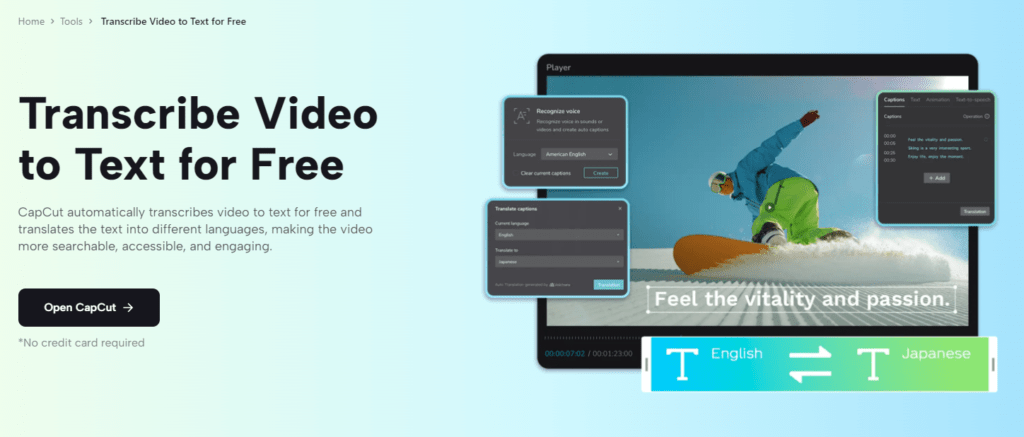
In the dynamic landscape of digital content creation, accessibility has emerged as a crucial aspect, ensuring that information is available to everyone, regardless of their abilities or disabilities. One groundbreaking development in this realm is the rise of video-to-text transcription services. Beyond the basic provision of captions, modern tools like CapCut are changing the game by automatically transcribing videos to text for free. This article explores the evolution and profound impact of content when you transcribe video to text for enhancing accessibility in diverse contexts.
The Evolution of Video-to-Text Transcription
Video content has become a dominant force in online communication, from educational resources and business presentations to entertainment and social media. However, this surge in video consumption brought to light the need for improved accessibility. Traditional captioning, while valuable, often required manual input, making it time-consuming and sometimes error-prone.
Enter video-to-text transcription services like CapCut, leveraging automatic speech recognition (ASR) technology to transcribe spoken words into written text. This evolution represents a transformative step forward, providing not just captions but an entire textual representation of the video content.
Key Features Revolutionizing Accessibility
- Multilingual Support
One of the standout features of modern video transcribers is their ability to work in multiple languages. CapCut, for instance, supports languages such as Chinese, English, Japanese, Korean, and more. This broad language coverage ensures that individuals worldwide can access content in their preferred language, fostering inclusivity on a global scale.
- Real-time Captions
The integration of real-time captions enhances the user experience by displaying transcribed text synchronized with the ongoing video playback. This feature caters not only to individuals with hearing impairments but also to those who prefer or benefit from reading along while watching, improving overall engagement.
- User-Friendly Interface
Accessibility is not just about the result but also about the journey. Video transcribers like CapCut offer a user-friendly interface, simplifying the process of uploading videos, transcribing content, and customizing captions. This ease of use encourages content creators to embrace accessibility without a steep learning curve.
Empowering Businesses and Content Creators
For businesses and content creators, the impact of video-to-text transcription extends to broader audiences and increased engagement. Accessible content is not only a legal and ethical consideration but also a strategic move to reach a wider demographic. Search engines index text, making transcribed videos more discoverable, and the ability to translate transcriptions facilitates global outreach.
Moreover, the customization options offered by video transcribers like CapCut enable content creators to refine and tailor captions according to their audience. Deleting unnecessary parts or adding context enhances the clarity and relevance of the content, ensuring that it resonates effectively with the intended viewership.
Transforming Accessibility Through Enhanced Visuals
In an era dominated by visual content, accessibility becomes a crucial consideration. CapCut’s upscale image feature emerges as a transformative tool, offering a seamless solution to enhance visuals and make them accessible to a wider audience. This article delves into how CapCut’s image upscale contributes to an inclusive digital experience.

- Breaking Resolution Barriers
CapCut’s image upscale feature excels in breaking resolution barriers. By allowing users to upscale images by 400%, it ensures that even low-resolution visuals can be transformed into high-quality masterpieces. This not only enhances the aesthetic appeal but also ensures that individuals with varying display capabilities can enjoy content without compromising on quality.
- Preserving Natural Look and Quality
One of the standout features of CapCut’s image upscale is its ability to preserve the natural look and quality of the visuals. This is paramount for accessibility as it ensures that the essence of the content remains intact. For users with visual impairments relying on screen readers or other assistive technologies, maintaining the integrity of visual elements is crucial for a meaningful interpretation of the content.
- Denoising for Enhanced Clarity
CapCut’s image upscale goes beyond mere enlargement; it incorporates advanced denoising algorithms. This is a game-changer for accessibility, especially for individuals with visual sensitivities. By intelligently removing noise while upscaling, CapCut ensures that the enhanced visuals are not only larger but also clearer. This clarity is essential for conveying information effectively, benefiting users with different visual needs.
- Adding Details for a Richer Experience
Enhancing image quality involves more than just upscaling; it involves adding details intelligently. CapCut’s image upscale excels in this aspect, contributing to a richer visual experience. For users who rely on magnification tools or zoom features, the added details become instrumental in comprehending intricate elements within the visuals, fostering a more engaging and accessible interaction.
- Versatility for Diverse Applications
Accessibility extends beyond resolution and clarity; it encompasses the adaptability of visuals for diverse needs. CapCut’s image upscale is versatile, accommodating various types of photos – from original shots to drawings. This versatility is a boon for content creators, designers, and editors, ensuring that accessibility-enhanced visuals cater to a wide array of purposes, from educational materials to creative projects.
The Future of Accessibility
As technology continues to advance, the future of video-to-text transcription holds even greater promise. Improved accuracy in speech recognition, expanded language support, and seamless integration with various platforms are on the horizon. The goal is not only to meet accessibility standards but to surpass them, creating an online environment where information is not just available but easily accessible and comprehensible to everyone.
Conclusion
In conclusion, the evolution of video-to-text transcription services represents a significant leap forward in enhancing accessibility. The impact is felt across education, business, and content creation, fostering a more inclusive digital space. As these technologies continue to evolve, the vision of a truly accessible online world moves closer to reality. By shattering resolution barriers, preserving natural aesthetics, and enhancing clarity and details, image upscale paves the way for a more inclusive and diverse digital landscape. As we move towards a future where visuals dominate the online experience, tools like CapCut’s image upscale play a pivotal role in ensuring that accessibility remains a top priority.