Rizwan Ali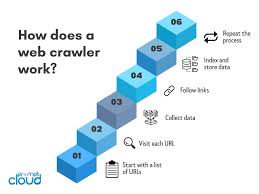
You’ve probably heard the term thrown around in data, SEO, or developer circles — list crawlers. But unless someone’s explained it in plain English, it can feel like one of those technical concepts that’s somehow both everywhere and nowhere.
Here’s the short version: list crawlers are automated tools that pull structured data from web pages — think product listings, job boards, or directories — at scale. They don’t grab everything on a page. They target repeating patterns and extract exactly what you need, row by row, page by page.
Whether you’re doing market research, building a lead list, or monitoring competitor pricing, understanding list crawlers gives you a serious edge.
What Is a List Crawler, Exactly?
A list crawler is a type of web scraper built specifically to extract data from pages that display information in a repeating format.
Think of an e-commerce category page. Every product tile follows the same layout — name, price, image, rating. A list crawler applies one extraction pattern across all those items, then flips to the next page and does it again. Automatically.
This is different from a general web crawler (like Googlebot), which roams the entire web indexing content for search engines. List crawlers are surgical. They’re pointed at a specific URL, a specific data pattern, and told: get me all of this.
Common use cases include:
- Lead generation from online directories
- Price monitoring across retailer sites
- Job listing aggregation from multiple boards
- Real estate data pulled from listing platforms
- Competitor research at scale
How List Crawlers Actually Work
The process is more straightforward than it sounds.
A list crawler starts at a seed URL — say, page 1 of a product catalog. It reads the HTML structure, finds the repeating elements (each product card, each listing row), and extracts the data fields you’ve defined. Then it detects the “next page” button and follows it.
Static pages? A simple HTTP request does the job. JavaScript-heavy sites that load content dynamically? That’s where browser automation tools like Playwright or Puppeteer come in. They simulate a real browser, wait for content to render, then extract.
There are three core techniques most list crawlers use:
1. CSS selector-based extraction — You target elements by class or ID. Fast and efficient on stable sites.
2. XPath queries — More precise, useful when class names are messy or inconsistent.
3. API interception — Some sites quietly call an internal API to load list data. Capturing that API response is cleaner than scraping HTML at all.
The smartest crawlers in 2026 also use AI-assisted extraction. Instead of manually defining selectors, you tell the tool “get the product name and price” and it figures out the structure automatically — even if the site’s layout changes later.
The Top List Crawler Tools You Should Know
You don’t need to build a crawler from scratch. Several solid tools exist for different skill levels.
Scrapy is the gold standard for Python developers. It’s open-source, fast, and handles complex pagination well. But there’s a learning curve.
Firecrawl has become one of the most popular options for teams that want results without deep configuration. It handles JavaScript rendering and outputs clean markdown — roughly 67% fewer tokens than raw HTML, which matters if you’re piping data into an LLM or RAG pipeline.
Octoparse and ParseHub are no-code options. You point and click to build your extraction logic. Great for marketers or analysts who don’t write code.
Crawlee (by Apify) is a Node.js library that bundles crawling and browser automation together. It supports Puppeteer and Playwright crawlers out of the box.
If you’re scaling up, Scrapfly’s Crawler API handles the full workflow — URL discovery, link-following, deduplication, and anti-bot bypass — without you managing any infrastructure.
Common Mistakes That Kill Your Crawl
Most list crawling failures come from a handful of predictable errors.
Ignoring JavaScript rendering is the biggest one. If your crawler returns empty data or partial results, the page is probably loading content dynamically. Check the page source against the rendered DOM in DevTools — if they look different, you need a browser-based crawler.
Not handling pagination correctly trips up a lot of beginners. Some sites cap visible pages at 20–50 even when thousands of results exist. The workaround: apply filters (price ranges, categories, dates) to break the data into smaller, fully accessible segments.
Getting rate-limited or blocked is almost inevitable on commercial sites. Space out your requests. Rotate user agents. Use proxies if the site is aggressive. And always respect robots.txt — not just ethically, but practically, since ignoring it often triggers faster blocking.
Duplicating data across pagination is also common. Track extracted URLs in a set and skip anything you’ve already seen.
Best Practices for List Crawling in 2026
A few habits separate reliable crawlers from fragile ones.
Start simple. Use plain HTTP requests first. Only escalate to browser automation when static extraction doesn’t work. Browser-based crawlers are slower and more resource-intensive — don’t use them when you don’t need to.
Build in retry logic. Networks fail. Sites go down. A crawler with no retry mechanism loses data silently.
Validate your output. Check for missing fields, blank values, or garbled characters immediately after each run. Catching a broken selector on run one is far better than discovering it after 10,000 rows.
For long-running crawls, implement session refresh logic. Authentication tokens expire. If your crawler hits a login wall mid-run and keeps going, you’ll end up with nothing.
Finally, document your selectors. Sites redesign. When the class names change six months from now, you’ll thank yourself for leaving clear notes.
Real-World Applications Worth Knowing
A few examples make the value concrete.
A real estate agency might crawl MLS-style listing directories nightly, auto-populating their own site with current inventory — no manual data entry, always up to date.
A SaaS pricing team might run a list crawler across 15 competitor sites weekly, feeding the results into a spreadsheet to track pricing shifts over time.
A recruiter could aggregate job listings from multiple boards into one internal database, filtering by keywords, location, and seniority automatically.
None of these require a massive engineering team. With the right tool and a clear extraction pattern, most list crawling projects are a weekend’s work.
The bottom line: list crawlers are one of the most practical data tools available, and in 2026, the barrier to entry has never been lower. Pick a tool that matches your skill level, start with a single paginated list, and build from there. The techniques that work on one site transfer everywhere.