Rizwan Ali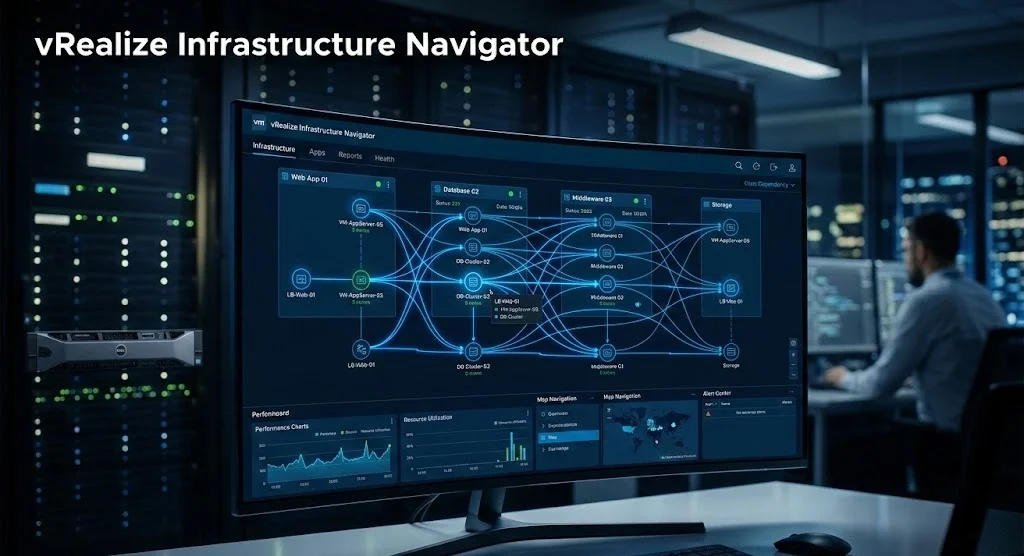
Picture this: your team gets a 2 a.m. alert. A critical app is down. You know it lives somewhere across 400 virtual machines — but you have no idea what depends on what. That’s exactly the nightmare vRealize Infrastructure Navigator was built to eliminate.
This VMware tool doesn’t just show you VMs on a screen. It maps the living, breathing relationships between your applications, services, and infrastructure — automatically, in real time, without touching a single guest OS.
What Is vRealize Infrastructure Navigator?
vRealize Infrastructure Navigator (VIN) is a VMware solution designed to give IT administrators application-aware visibility inside virtualized environments. Instead of staring at raw metrics like CPU and RAM, VIN shows you what’s connected to what — web servers talking to databases, middleware feeding business apps, everything laid out visually.
It integrates directly with VMware vCenter Server, which means you’re not installing a separate console or learning a new interface from scratch. The dependency maps show up right inside your existing vSphere environment.
How It Discovers Applications Without Agents
This is where VIN gets genuinely clever. Most monitoring tools require you to install agents inside every virtual machine. VIN skips all of that. It passively analyzes network traffic between VMs and uses application signature recognition to identify what’s running.
It recognizes over 200 enterprise application types — including common web servers, Oracle and MySQL databases, messaging systems like RabbitMQ, and middleware platforms. No agents, no performance hit, no compatibility headaches.
Why vRealize Infrastructure Navigator Matters for IT Operations
Ever wonder why infrastructure changes still cause unexpected outages even when teams plan carefully? Usually it’s because nobody had a complete picture of application dependencies before pulling the trigger.
VIN solves that directly. Before you migrate, decommission, or patch a VM, you can pull up its dependency map and see exactly which services will be affected. That single capability alone has helped teams cut change-related incidents significantly.
Faster Troubleshooting, Fewer War Rooms
When something breaks, time is money. VIN lets you trace upstream and downstream dependencies in seconds rather than spending an hour cross-referencing tickets and Visio diagrams that were last updated in 2019.
A mid-size healthcare company running 600+ VMs across 3 data centers used VIN to cut their mean time to resolution (MTTR) from 47 minutes to under 12 minutes on average. The dependency maps replaced three manual spreadsheets their team had been maintaining for years.
Better Collaboration Between Siloed Teams
Infrastructure teams and application teams often have completely different mental models of the same environment. VIN creates a shared visual language. When both teams can look at the same dependency map, conversations get shorter and decisions get faster.
Key Features Worth Knowing
- Agentless discovery — no software installed on guest VMs
- Automated dependency mapping — relationships update in real time as environments change
- Change impact analysis — see what breaks before you make a move
- vCenter integration — works inside your existing VMware workflow
- Application signature library — identifies 200+ enterprise apps automatically
How vRealize Infrastructure Navigator Fits Into Larger VMware Environments
VIN doesn’t operate in isolation. It was designed as part of the broader VMware vRealize Suite, which includes vRealize Operations (for performance monitoring) and vRealize Log Insight (for log analytics). Together, these tools give you a three-dimensional view of your environment: what’s running, how it’s performing, and how everything connects.
If you’re already using vRealize Operations, adding VIN is a natural extension. The dependency data from VIN feeds directly into change management workflows, making capacity planning and disaster recovery planning more accurate.
Real-World Use Case: Data Center Consolidation
During a data center consolidation, one logistics company discovered that 37 of their VMs had undocumented dependencies on a legacy authentication server nobody knew was still in production. VIN surfaced that relationship automatically. Without it, decommissioning that server would have taken down several business-critical systems with zero warning.
That’s not a hypothetical. That’s the kind of thing VIN was specifically built to catch.
Common Mistakes Teams Make Without Dependency Mapping
- Assuming documentation is accurate — it rarely is after 12+ months
- Skipping pre-change impact assessments — “it should be fine” is never a plan
- Relying on tribal knowledge — when that person leaves, the knowledge leaves too
- Manual dependency tracking in spreadsheets — impossible to keep current at scale
Each of these mistakes becomes a non-issue once VIN is running and mapping your environment continuously.
What You Should Know About Its Current Status
VMware officially end-of-lifed vRealize Infrastructure Navigator as it transitioned its portfolio into VMware Aria (formerly the vRealize Suite). Current VMware environments use VMware Aria Operations and related tools, which incorporate dependency visibility features within a broader observability platform.
If you’re running an older vSphere environment and considering VIN, it’s worth knowing this context. If you’re evaluating new tools, look at VMware Aria Operations for the successor capabilities — the dependency mapping philosophy carries forward, even if the product name changed.
The Bottom Line
vRealize Infrastructure Navigator gave IT teams something genuinely valuable: the ability to see their environment as it actually exists, not as they hope it does. Agentless discovery, real-time dependency maps, and change impact analysis made it one of the most practical visibility tools in the VMware ecosystem.
Whether you’re managing an existing VIN deployment or evaluating what replaced it, understanding how application dependency mapping works will make you a sharper, faster, more confident infrastructure administrator. Your 2 a.m. alerts will still come — but at least you’ll know exactly where to look.

 Mudassir Ali